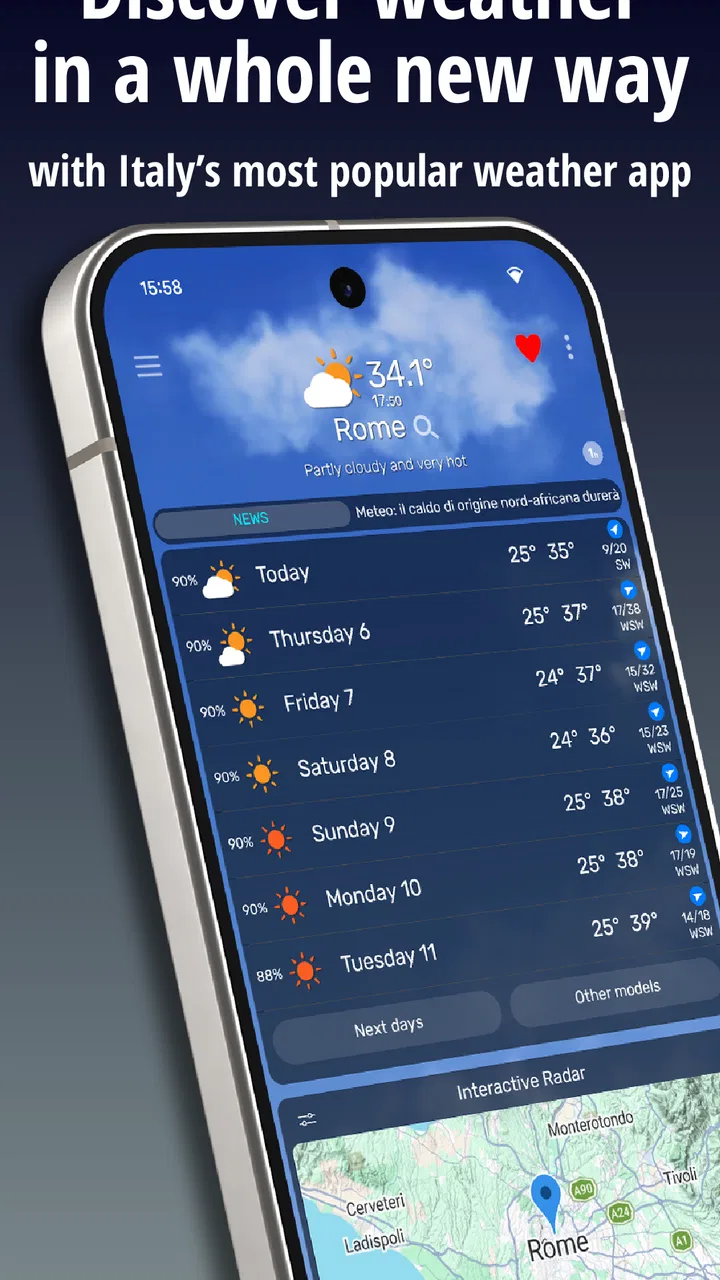
TheWeather: weather forecast
- 3.9
- Rating
- 10.00M
- Installs
- Free
- Price

 Analysis by App-foxy
I tend to judge a weather app by what happens five minutes before I leave home: can I understand the forecast quickly, decide what to wear, and spot a change that might affect my plans? TheWeather approaches that everyday problem with a distinctly Italian focus. Developed by ILMETEO srl, it is a free weather app for Android and iOS that combines forecasts with radar, webcams, and weather alerts. I found it most useful when I wanted more than a single temperature number and needed a visual sense of what was happening nearby.
The app has been around since August 21, 2010, and its reach is substantial, with more than ten million installs and an average rating of 3.9 from roughly seven hundred thousand ratings. Those figures suggest a well-established service rather than a small experiment, but they also tell me to keep expectations realistic: a popular app can still feel busy or imperfect depending on how I use it. TheWeather is free to download, rated for Everyone, and includes optional in-app purchases ranging from around a dollar to ten dollars per item.
How I Decide Whether a Weather App Is Worth Keeping
My first decision criterion is speed. A forecast is useful only if I can read it without digging through several layers of menus. TheWeather generally works well for quick checks because the current conditions and near-term outlook are presented as the main reason to open the app. I can begin with the basic question—what is it like outside?—and then move deeper when the situation deserves more attention.
You May Also Like

 Pandora - Music & Podcasts
Pandora’s Music Is Easy to Start, but Harder to Recover
Pandora’s strength is its low-effort path from a seed to a station. Its weak spot is how much confidence it asks you to place in connection, setup, and quiet recovery.

 AccuWeather: Weather Radar
AccuWeather Review: A Quick, Clear Forecast for Everyday Decisions
For everyday plans, the best forecast is the one you can understand quickly. AccuWeather makes rain timing, radar, and local conditions easy to act on, with a few trade-offs.

 Hill Climb Racing
Why Hill Climb Racing Still Turns Crashes Into One More Run
A tiny car, a bumpy hill and one more upgrade: Hill Climb Racing keeps resurfacing because its simple chaos makes every near-miss feel personal.

 AliExpress - Shopping App
AliExpress Makes Global Shopping Feel Personal, but Shoppers Bear the Risk
AliExpress turns a global marketplace into a pocket-sized discovery engine. Its reach is useful, its shopping loop compelling, and its trade-offs easy to miss.

 Lords Mobile: Kingdom Wars
Lords Mobile Is a Kingdom-Building Routine, Not a Quick Match
A case-by-case verdict on the building, battles, device demands, and social commitments that make Lords Mobile rewarding for some players and exhausting for others.

 PDF Scanner app - TapScanner
TapScanner Makes Paperwork Easier to Capture, Check, and Share
TapScanner makes scanning with a phone feel less like a rescue operation and more like a dependable step in getting work done. Its capture tools are useful, though not flawless.
More From Our News Desk
View All News


The second criterion is confidence. Weather icons are convenient, but they can hide uncertainty. For a short walk, an icon may be enough. For a drive, outdoor work, a day at the coast, or a trip through changing terrain, I want supporting information. This is where the combination of weather radar, webcams, and alerts makes the app more useful than a stripped-down forecast widget.
I also look at how well an app supports different time horizons. A current-conditions screen helps with the next hour, while a daily forecast helps with planning tomorrow. Radar and webcams answer a different question: what is happening in the area right now, and does the forecast appear to match what I can see? TheWeather is strongest when I use these layers together instead of treating the first screen as the whole story.
There is a practical trade-off here. More information can improve a decision, but it can also make an app feel crowded. Someone who wants only a clean temperature and a simple rain icon may prefer a basic phone weather tool. I am willing to accept a denser interface when I need local context, but I would not recommend choosing this app solely because it offers more screens. The value depends on whether I will actually use those extra views.
Using the App for an Ordinary Morning
Imagine I am leaving for work, school, or an appointment and the sky looks uncertain. I first check the current conditions, then glance at the short-term forecast rather than relying only on the full-day symbol. If rain appears possible, I open the radar to see whether precipitation is approaching or already forming nearby. A webcam can add another useful reality check, especially when the forecast feels too general for the exact place I am visiting.
That workflow is more reliable than repeatedly refreshing a single temperature reading. It also avoids a common mistake: assuming that a rain symbol means rain will fall continuously everywhere in the area. Radar gives me movement and coverage, while a webcam can show the visible situation at a particular location. Neither replaces judgment, but together they help me decide whether I need an umbrella immediately or simply want one available later.
For a commute, I find alerts more valuable than decorative details. If a significant weather change is relevant to my location, an alert can save me from checking manually at the wrong moment. I would still review the alert’s context before changing a major plan. Notifications are useful prompts, not a guarantee that conditions will be identical on every street or at every minute.
Where TheWeather Wins
The clearest strength is its combination of forecast information and visual tools. Many ordinary weather apps are designed around a glanceable card: temperature, icon, and perhaps a short outlook. That approach is excellent for routine mornings, but it leaves me with little help when the weather is changing quickly. TheWeather gives me a path from a simple check to a more informed local assessment.
The radar is particularly valuable for deciding whether timing matters. If I am planning a walk, cycling route, market visit, or short outdoor job, I do not necessarily need a detailed long-range forecast. I need to know whether the current weather pattern is moving toward me. The radar helps turn a vague “maybe rain” into a more practical decision about leaving now, waiting, or taking protection.
Webcams offer a different advantage that is easy to underestimate. A forecast describes expected conditions, while a camera can show the character of a place at that moment: visibility, cloud cover, wet surfaces, or how busy and exposed an outdoor area appears. This is especially helpful when I am deciding whether a destination is worth visiting, rather than merely deciding what to wear at home.
The Italian orientation is another reason I would consider it. A service built around Italian users is more appealing to me when my plans involve Italian cities, towns, coastlines, or mountain areas. Location matters in weather, and a locally focused product can feel more relevant than a global app that treats every place with the same broad presentation. I would not assume that local focus automatically makes every prediction better, but it is a meaningful reason to test this app if Italy is where I spend most of my time.
I also appreciate that the free version gives people a way to evaluate the core experience before spending anything. The optional purchases may suit users who want additional conveniences, but I would begin with the free app and see whether radar, webcams, forecasts, and alerts already cover my routine. That prevents a common mistake: paying for extras before knowing whether the interface and forecast style fit my habits.
Small Habits That Make the App More Useful
One useful habit is to compare the forecast with the radar before making a time-sensitive plan. If the daily forecast shows rain but the radar suggests the nearest precipitation is moving away, I may choose a different departure time. If the daily icon looks harmless while a band of rain is approaching, I would give the radar more weight for the next few hours. This is not about finding a perfect prediction; it is about choosing the most relevant view for the decision.
A second habit is to use webcams as a destination check rather than a substitute for forecasting. When I am considering a beach, viewpoint, ski area, or busy outdoor place, the camera can reveal conditions that a general city forecast cannot communicate well. I would check it shortly before leaving and again if the journey is long. A webcam is most helpful when the destination itself matters, not when I am simply checking the weather outside my front door.
A third is to treat alerts as a reason to review, not as permission to stop thinking. Weather warnings can be important, but the practical impact depends on location, timing, and the activity I have planned. I would use an alert to open the app, inspect the relevant forecast and radar, and then decide what action makes sense. This workflow is more dependable than either ignoring alerts or reacting to every notification automatically.
For travel, I would check several locations along the route rather than only the departure point. A pleasant forecast at home says little about a destination with different terrain or exposure. TheWeather becomes more useful in that situation because its visual tools encourage me to inspect the actual places involved. I would still keep a backup plan for outdoor activities, particularly when a delay or storm would have serious consequences.
Where Another Kind of Weather App May Fit Better
TheWeather is not automatically the best choice for everyone. If my priority is a minimal home-screen glance, the weather tool already included with my phone may be more comfortable. A simpler app can reduce distractions and make the daily routine faster. I would choose that route if I rarely look at radar, never use webcams, and only need a basic current reading.
Someone who travels across many countries may also prefer a broader international weather service. TheWeather’s Italian identity is a benefit for an Italy-centered routine, but a frequent international traveler may value consistency across a large number of regions more than local emphasis. I would compare how each service handles the places I actually visit instead of assuming that one app is universally stronger.
People who dislike notifications should think carefully about alert settings and their own habits. Alerts can be helpful, but any weather service becomes irritating when it interrupts without improving a decision. I would keep only the notifications that support a real need, such as protecting a commute or outdoor responsibility. If I want a completely passive experience, a quiet, simple forecast app may be a better match.
There is also a difference between visual detail and ease of use. Radar and webcams add context, but they require me to spend a little more time interpreting what I see. A user who wants one clear answer may find that extra choice unnecessary. I prefer having the option, yet I would not recommend TheWeather to a friend who already knows that detailed weather layers make them ignore the app altogether.
What Switching Actually Involves
Moving to TheWeather is relatively easy when I only need a free weather service and a familiar location-based routine. I can start with current conditions, explore the forecast, and gradually decide whether radar, webcams, or alerts deserve a place in my daily checks. I do not need to commit to every feature on the first day, which makes the change less disruptive than switching to a specialized planning tool.
The real cost of switching is not money; it is habit. If I am used to opening a very simple widget, I may initially spend longer finding the information I want. The solution is to create a personal routine: current conditions for quick checks, the short-term forecast for timing, radar for approaching precipitation, and webcams for destination decisions. Once that sequence becomes familiar, the additional information feels purposeful rather than overwhelming.
I would also avoid paying immediately. The app is free, while optional purchases are available from about one dollar to ten dollars per item. I would first test it during ordinary weather and during at least one uncertain day. That gives me a better sense of whether the presentation is clear, whether the local coverage suits me, and whether the free experience is enough. Paying only makes sense when a specific extra solves a problem I genuinely have.
For families, the Everyone age rating makes the app broadly approachable. Still, I would teach younger users not to treat a forecast icon as a safety instruction. In serious weather, an alert should lead to adult judgment and trustworthy local guidance. The app can support awareness, but it should not become the only basis for decisions involving travel, outdoor exposure, or dangerous conditions.
My Recommendation for Different Users
I recommend TheWeather to people who want an Italian-focused weather experience with more depth than a basic forecast card. It is a good fit if I regularly check changing conditions, plan outdoor activities, travel between nearby locations, or find webcams and radar genuinely useful. The app’s established presence and large user base make it an easy service to try, especially because the basic download is free.
I would recommend it less strongly to someone who wants the quietest and simplest possible weather screen. In that case, a built-in phone app may be faster and less demanding. I would also look elsewhere if my main need were a single international service for constant travel across many countries. The right choice depends on whether local visual context matters more than minimal presentation or worldwide consistency.
My own approach would be to install it without purchasing anything, set up the locations I care about, and test one complete decision cycle: check the forecast, inspect radar when timing matters, and use a webcam for a destination if one is relevant. If those layers help me make better choices, the app earns its place. If I keep returning only for the temperature, I would simplify and use a lighter alternative.
Overall, TheWeather is more than a quick temperature display, but its extra value appears only when I use the tools deliberately. My recommendation is clear: choose it when radar, webcams, and alerts can change your plans; skip it when all you want is a quiet glance at today’s weather. That makes it a practical decision tool for many Italian weather routines, while still leaving room for simpler or more internationally oriented alternatives.
FAQs for TheWeather: weather forecast
01What features does TheWeather app offer?
TheWeather app provides comprehensive weather forecasts, including hourly and daily updates, severe weather alerts, and radar maps. It also offers customizable widgets, detailed climate data, and real-time weather news. Users can personalize notifications and access weather insights for multiple locations globally, making it a versatile tool for planning activities.
02Is TheWeather app free to use, or does it require a subscription?
TheWeather app offers a free version with essential features, supported by ads. For an ad-free experience and access to premium features like advanced radar and extended forecasts, users can opt for a subscription. Subscriptions are typically available on a monthly or annual basis, providing flexibility based on user needs.
03How accurate is the weather data provided by TheWeather app?
TheWeather app sources its data from reputable meteorological services, ensuring high accuracy. It uses advanced algorithms to deliver precise real-time forecasts. While no weather app can guarantee 100% accuracy due to the unpredictability of weather, TheWeather app is known for its reliable and up-to-date information.
04Can I customize the notifications in TheWeather app?
Yes, TheWeather app allows users to customize notifications according to their preferences. You can set alerts for severe weather conditions, daily forecast summaries, or specific weather changes. This feature ensures you stay informed about important weather updates relevant to your location or travel plans.
05Does TheWeather app support multiple locations?
TheWeather app supports tracking weather for multiple locations. Users can easily add and switch between locations to view current conditions and forecasts. This feature is particularly useful for frequent travelers or those monitoring weather in different areas for family, work, or leisure purposes.
Pros
- Accurate and timely weather updates.
- Intuitive user interface for easy navigation.
- Customizable alerts for severe weather.
- Detailed forecasts for multiple locations.
- Minimal ads for a smooth experience.
Cons
- Requires internet connection for updates.
- Limited features in the free version.
- Occasional crashes on older devices.
- Some features hidden behind paywall.
- Battery usage can be high with GPS.

TheWeather: weather forecast
Gallery